Home › Free Tools › Random Team Generator
✨ 100% Free · No Sign-Up · Works on Any Device
Random Team Generator
Paste your list of names and create fair, random teams in one click – for classrooms, sports, work and game night.
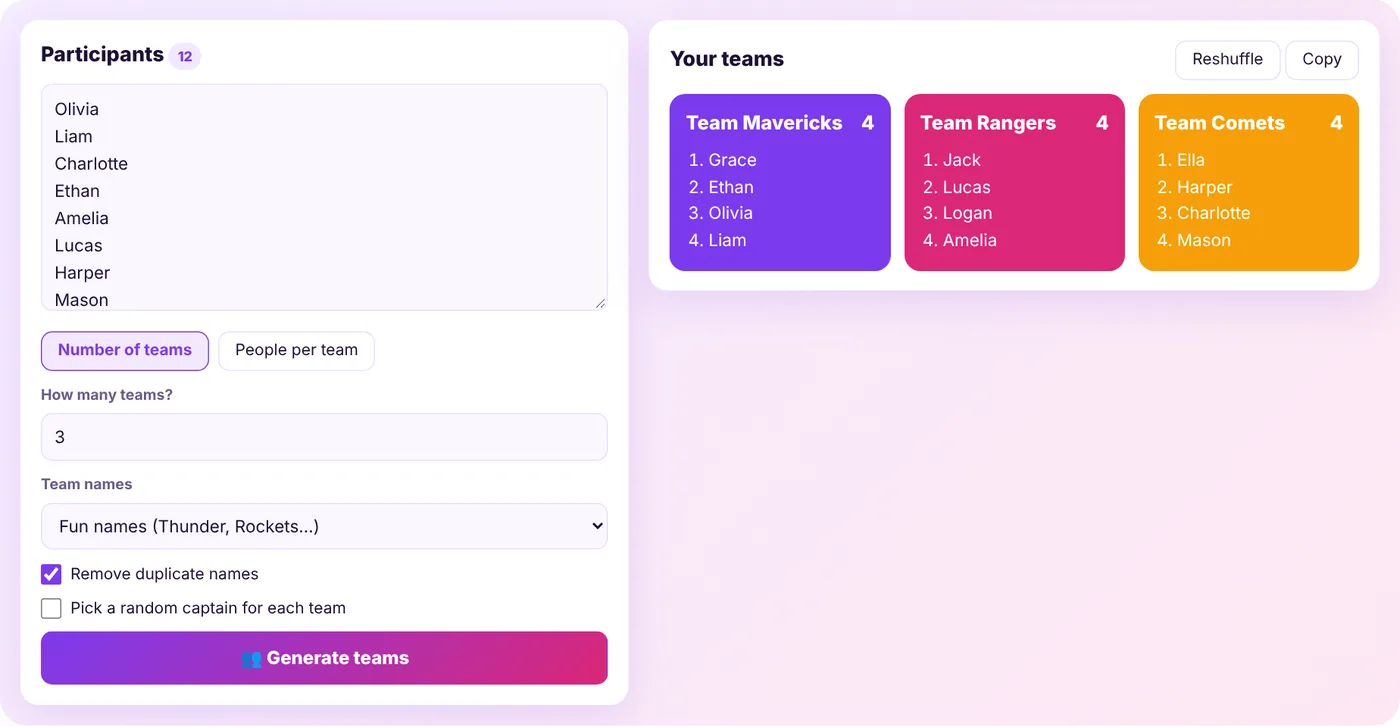
Overview
Make Fair Teams in Seconds
Picking teams by hand is slow and can leave people feeling left out. The Spinpik Random Team Generator shuffles your list and splits it into balanced groups instantly, so nobody can say the teams were rigged.
Choose how many teams you want – or how many people should be on each team – and the generator handles the rest. You can give teams fun names, pick a random captain for each group and copy the results to share in chat or email.
Step by step
How to Generate Random Teams
Step 1
Type or paste the participants, one name per line.
Step 2
Choose Number of teams or People per team and enter a number.
Step 3
Pick a team-name style and, if you like, turn on random captains.
Step 4
Press Generate teams. Not happy? Hit Reshuffle for a brand-new split.
Features
Team Generator Features
Simple controls with the options teachers and coaches ask for.
Two Split Modes
Divide by number of teams or by team size.
Balanced Groups
Team sizes never differ by more than one person.
Random Captains
Automatically pick a leader for every team.
Fun Team Names
Use fun names, colors, letters or simple numbers.
Duplicate Check
Optionally remove names that appear twice.
Copy & Share
Copy all teams as clean text with one click.
Use cases
Great For
FAQ
Frequently Asked Questions
Keep exploring
More Free Tools
Want a Visual Pick?
Spin a wheel to choose a single person, prize or task in front of the whole group.